
Business Woman Aaron Wealth Management

COVID-19 Cash flow management strategies

Financial survival has been top of mind for many business owners since the first lockdowns were declared in March of 2020. Almost 40% of Canadian entrepreneurs are now trying to balance rebuilding their financial health against business needs

How to manage your finances to ensure the continuity of your business?

Here are few cashflow strategies that will help your business survive during time of economic downturn or catastrophic events such as COVID-19.

1. Agility is key

Business owners who are agile can pivot their operations and optimize their sales reducing the impact of the economic slowdown.

2. Lower expenses

Lowering expenditures to reflect reduced revenue can help businesses break even and keep their doors open.

3. Operate safely

Your customers need to be protected and feel safe to do business with you. Your employees must have a safe work environment. Ensure your communications are clearly marked for customers and your employees are well trained.

4. Curtail unnecessary spending

Watching your margins during any reduced revenue period is critical. COVID-19 in a way, has been a live exercise in business survival. Stay on top of accounts receivables and manage your payables to the latest date possible. Negotiate longer payable terms where possible e.g. ask to move from 30 days to 60 days.

5. Plan ahead

OK, this one seems common sense although, when your busy fighting fires it’s easy to get caught up in the “right now.” Some of those fires are showing up because you didn’t plan far enough ahead. Get in front of your problems and forecast further out.

What’s Your Business Interruption Strategy?

Many years ago, we had a 120 seat cafe/restaurant with a liquor license that was extremely successful. Literally a line at the door. So busy in fact, I slept on a cot in the back (closed at 2 am and opened at 8 am) during our 1st year.

When the sun is shinning you’re not thinking about umbrellas!

~ David Aaron

It was August, our busiest month of the year and construction had began in the parking lot to remove an old building to make way for additional parking. The construction company accidentally cut the water main flooding the parking lot. The entire parking lot was closed off and torn up. They piled mounds of pavement, stone and dirt right in front of our business. You actually couldn’t see our business. Sales revenue in August was normally $80-90,000…we did $6,000!

The landlord provided a $1,700 credit towards our lease and do you think that made any difference? We never considered planning for such an event. We had 16 employees, perishable food inventories and just like that disaster!

Planning for the worst case scenario

1. Break-Even Analysis

Add up all your fixed expenses such are lease, salaries, communications, interest and principal payments on loans. Then, divide this by the margin you earn on each sale (usually a percentage).

If you think your business might not earn break-even levels, you may have to consider cutting your expenses to the strict bare minimum. Consider temporarily removing products/services which are unlikely to break-even during this period.

2. Do some “Spring Cleaning”

Time to sell anything you haven’t used a long time and will unlikely ever use it. Such things as, equipment & vehicles. Cash is king here! Examine where you can get short-term financing.

3. Renegotiate fixed costs

For our restaurant, we negotiated with the landlord to reduce the lease over a several months and increase the lease payment during our higher business volume. Examine if this is possible with your business. Heating & Air conditioning is one are to consider. Adjusting the temperature by 1-2 degrees over time reduce your energy bill. While it may be a little uncomfortable, the alternative is far worse.

4. Change Your Pricing

Modify your pricing on items with the highest margin to increase the margin. One example in our restaurant was, in the winter strawberries are very expensive comparative to the summer. We increased our price for a top selling menu item by a nominal amount and removed strawberries from the menu. Instant boom to our bottom line.

5. Flexible Working Arrangements

Can you work from home or move to a co-working space to transform fixed rental costs into variable costs. Can any employees work from home?

6. Pay attention to giving out credit

Scrutinize new clients on their credit worthiness. When sales volume is low you don’t want to take on a delinquent new client. Also keep a closer eye on customers who are falling behind with their bills. Ask for a partial payment to mitigate a larger delinquency – receiving some cash during these times is better than none at all.

7. Establish and maintain strong credit

“But I don’t need credit right now.” Establishing lines of credit is essential in business. Even General Electric ran out of credit during the 2008 financial crisis. Using credit during normal business cycles is good financial management. Having access to credit during economic contraction is critical to business sustainability.

8. Death by a thousand cuts

Pay attention to the small almost invisible expenses. They can add up to quite a bit:

  • Subscription services for social media platforms. LinkedI n is $100 per month for Sales Navigator. Perhaps a pause on this and similar accounts is necessary
  • Paid advertising – if you have modified your product/services discontinue ads which are promoting those items
  • Data charges – If business volume is low do you need to have the highest data package?
  • Infrastructure costs – During COVID-19 you’ve been paying for infrastructure to support a business at 80-110% volume when in fact you may have been at 20%. You need pivot quickly to reduce these costs.


Coronavirus

Living Through Coronavirus

“Most people who fall sick with COVID-19 will experience mild to moderate symptoms and recover without special treatment” ~ who.in

In January 2020 we heard a virus was emerging from China and soon after people tested positive for Covid-19 also known as Coronavirus. In fact, the first presumptive case reported in Ontario (and Canada) was a man in his 50s, who came from Wuhan, China and begins self-isolating. His wife becomes the second case and begins self-isolating the following day. The man’s illness is officially confirmed two days later.

On February 26, Ontario had 5 confirmed cases of the Coronavirus and people appeared to be unconcerned. We were told to wash our hands frequently, that the seasonal flu virus affected more people each year.

Until this point, most people had a growing concern of the Coronavirus but not panicked until… March 12, 2020, when Doug Ford, Ontario’s premier announced that publicly funded schools across the province will be closed for two weeks following March break. While announcing the decision, the Ontario premier also tells families to: 

travel and have fun

~Premier Doug Ford

When you’re told “have fun” nothing to worry about here, oh and by the way, we’re closing school for 2 weeks, that’s code for “full-blown pandemonium!” I was immediately reminded of the nuclear bomb drills we did at school as a child. Absolute panic and fear of what was to come.

Do you remember in March the frantic race to the grocery store, not to purchase Vitamin C but rolls and rolls of toilet paper. People’s greatest fear was not getting sick but not being able to wipe their butts! Seriously, people waited 2 hours in line to pay $40 for 12 rolls of toilet paper. Stockpiling toilet paper, Kleenex, baby wipes & sanitizers.

Woman builds throne from stockpiled toilet paper

People began saying “stock up on everything. It’s going to be bad, they’re going to close everything.” It was Friday, March 13 my wife and I were grocery shopping as we do every Friday. While I’m not deeply superstitious, it was “Friday the 13th” after all. The grocery store is usually buzzing on Friday but this was crazy!

Grocery store during Coronavirus

There was no meat as you can see and yes no toilet paper or sanitizer anywhere. From this moment on we lived in a different world. This was straight out of a science fiction movie.

Restrictions followed with businesses being closed, wearing a face mask, sanitizing your hands and, working from home. The government issued economic relief cheques to those who qualified and a huge swath of people were unqualified.

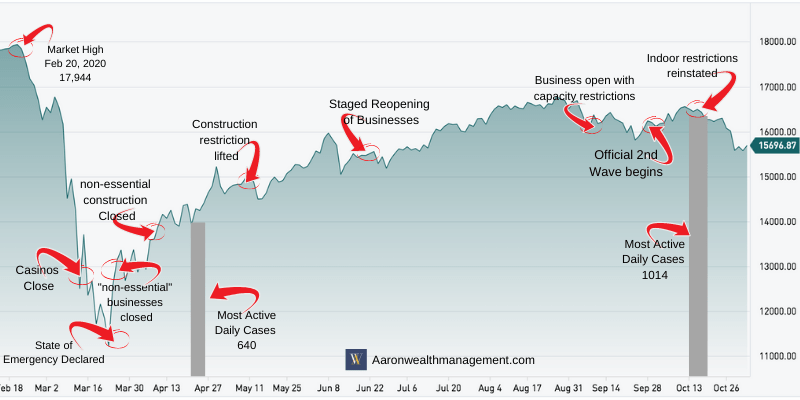
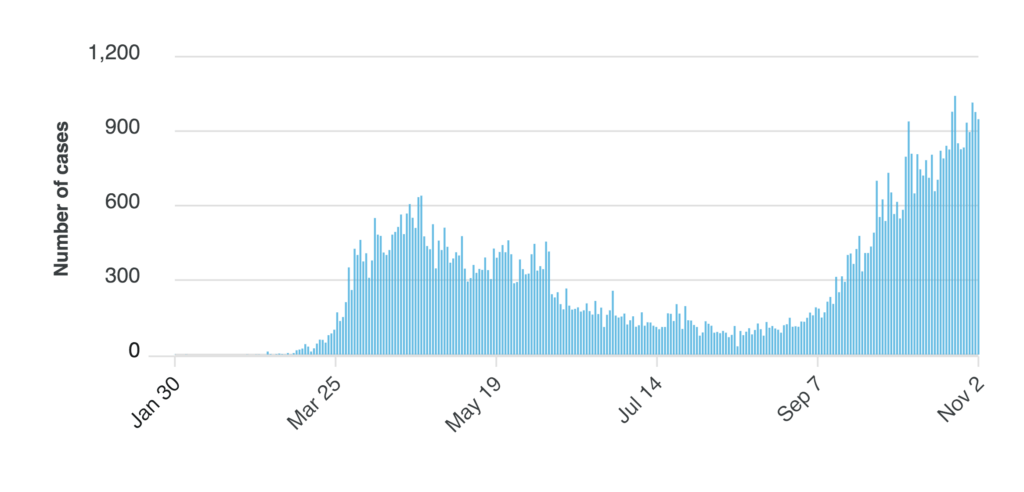
The peak of confirmed active daily cases of Covid-19 in Ontario was on April 23/24 with 640 infected people. Contrast that to the highest number of daily confirmed cases of 1,015 on October 15, 2020.

The difference between March and November is we really didn’t know what we were facing and how to deal with Coronavirus. We didn’t know anything about it and in fact the WHO’s direction on what to do changed several times. I’m not placing blame on anyone. We forget these are very difficult things to figure out and in fairness to the doctors and scientists, a great many people had to get sick first in order to determine how it attacks the body.

Case statuses

Despite this people figured out how to survive and live amongst a virus that was and is very deadly for a certain group of people.

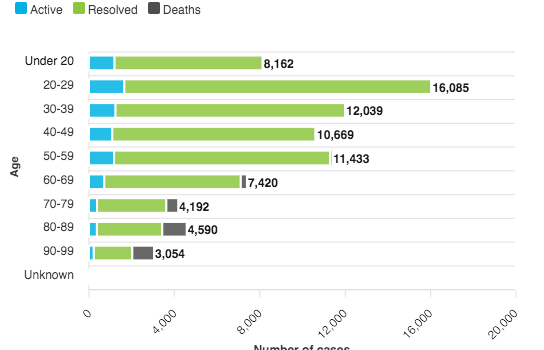
Corona Cases in Canada by age
https://covid-19.ontario.ca/data

The chart above illustrates the number of active & resolved coronavirus cases and deaths. Covid-19 is very dangerous for people with compromised health conditions and the elderly as noted above. The majority of deaths occurred between ages 60-99.

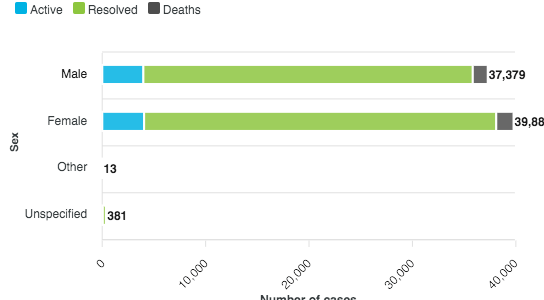
Coronavirus is gender neutral

https://covid-19.ontario.ca/data

Geographical hot spots

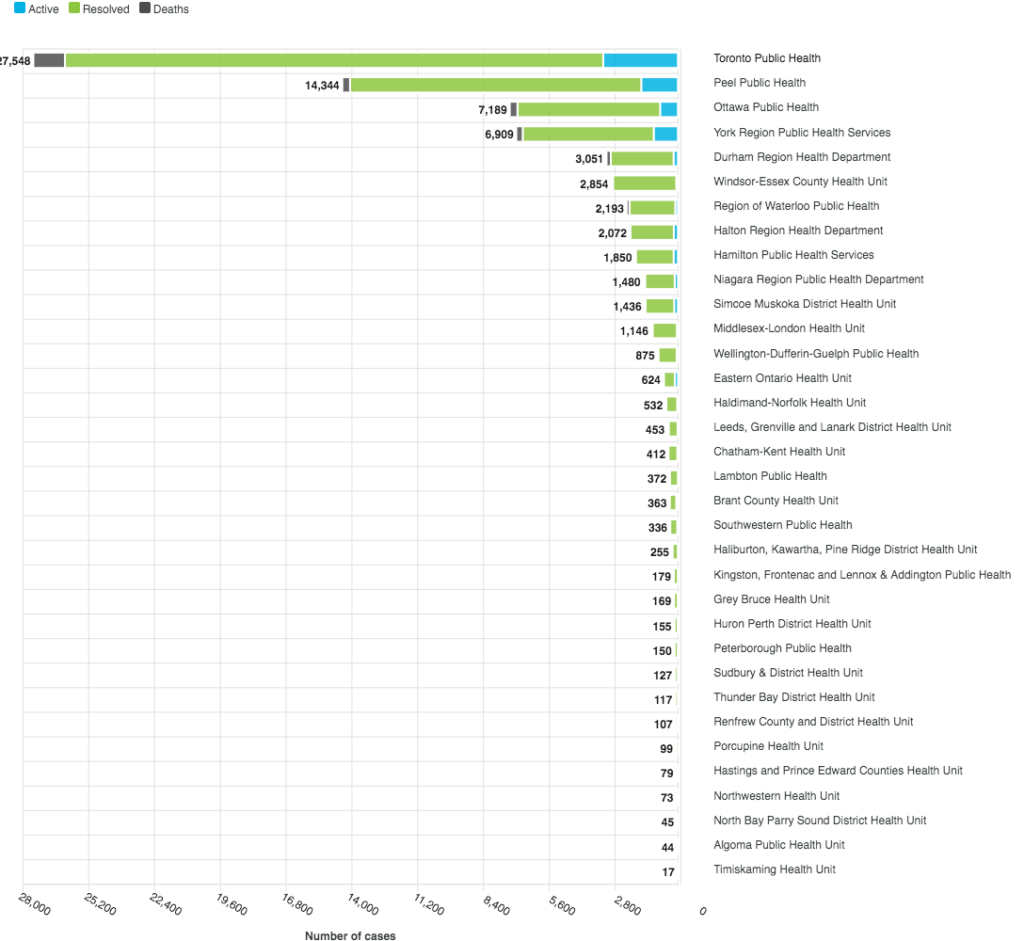
The majority of cases are in Toronto and the Peel region. So what does this mean? There are 14.5 million people in Ontario with 2.9 million residing in Toronto. For a great many people Coronavirus has not been a problem. I don’t want to appear dismissive about this. Coronavirus has killed over 10,000 people in Canada.

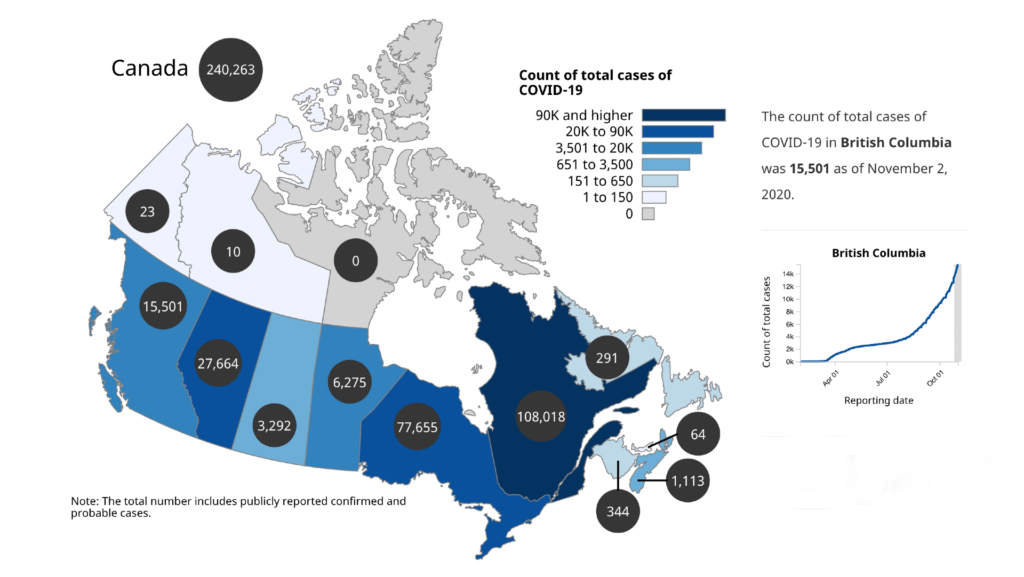
The majority of cases (77.3%) and deaths (92.4%) have been reported by Ontario and Quebec.

Progression of cases over time

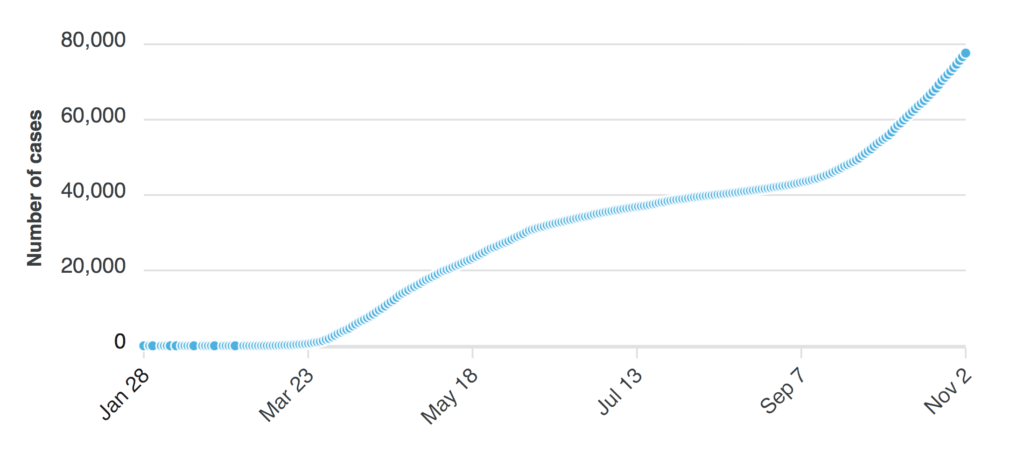
Back to the question of living with the Coronavirus outbreak. While the number of Active cases has gone up dramatically since September the number of deaths has not increased at the same rate. At the beginning of the outbreak, we were extremely unprepared and vulnerable. The province has done an excellent job of educating everyone on how to protect those who are most at risk of contracting the Coronavirus.

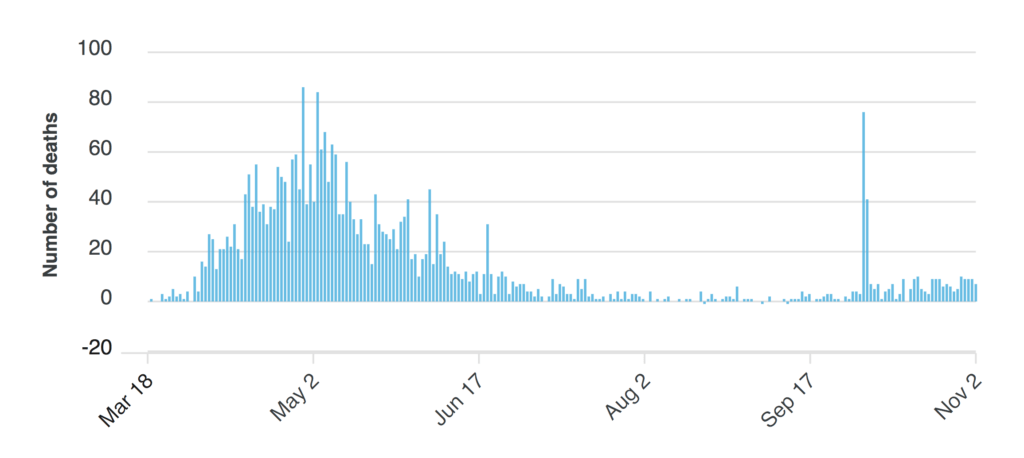
Coronavirus Deaths

Coronavirus New Cases

What is significant about the graphs above, is the contrast between new cases in November being nearly double the new cases at the highest point in April when the province was locked down. At the peak of new daily cases (640) on April 24, there were 50 deaths as compared to October 31 with 1,014 new daily cases and 9 deaths.

What this tells me is we understand how to live with the Coronavirus, how to protect ourselves and the people we love without the province being in lockdown. Everywhere I’ve gone in the GTA people are doing there part to keep safe:

  • Wearing a face mask
  • Sanitizing their hands, even the items they purchase
  • Utilizing hands-free door openers
  • Maintaining separation of at least 2 metres
  • Avoiding unnecessary travel
  • Learning how to work with digital products to conduct business

People have decided they can continue to work and to be social in a safe way. They have the tools, knowledge, and experience to move forward with their life without endangering others, especially those among us who are most vulnerable.

Toronto Wealth Management

Stay connected to your customers

Due to the COVID-19 pandemic, small business owners are limited in connecting with customers in person. Because we live in a digital world, there are still many ways you can stay connected to your customers through COVID-19 and inspire loyalty for years to come. Here are ways you can remain connected:

Be consistent

Ensure that you’re communicating to customers any changes in your business:

  • Update your website with contact information, business hours, and what you are or are not offering currently
  • Send emails about your products and any business updates, being careful not to bombard customers’ inboxes with too many messages
  • Share on social media frequently, especially positive messages that will help people take their minds off the pandemic
  • Keep communication open; it will help customers to know what is going on and how they can still support your business

Be transparent

If you’re having difficulty making deliveries on time or have many items that are out of stock, be proactive and let your customers know right away. Even if you don’t have the perfect solution to these problems, your customers will appreciate the upfront honesty.

Communicate your values

68 percent of consumers are motivated to be loyal if they know that a brand shares the same values as them.

Is your business donating supplies to those in need? Are you assisting employees during this difficult time? Share that information with your customers so they know you align with their beliefs. It will create a strong community of customers with a sense of belonging.

Additionally, if you have spent your marketing time and dollars on growing your online audience, now is the perfect time to leverage your role as an influencer and direct your followers to meaningful causes. Some social media sites, such as Facebook, allow you to collect donations, and most nonprofit organizations will provide simple ways to coordinate with their own fundraising efforts.

Get creative with your offerings

Now more than ever, businesses must think differently about their products and services. To make sales now and ensure that customers will come back post-pandemic, offer:

  • Gift cards, which provides you with immediate cash and gives customers a way to show their support (be sure to review all state laws to ensure compliance)
  • Discounts, especially for long-term purchases; gyms can offer a discount for memberships starting after the virus has passed, or retail stores can give free or discounted shipping for online orders

If you offer a service that can be accessed virtually, offer this through live or recorded videos. For example:

  • If you’re a personal trainer, consider conducting workout classes through platforms such as Google Hangouts or Zoom
  • If your business exclusively sells products, think of ways you can still offer something of value, even if it’s free
  • If you run a flower shop, you could host an Instagram Live session teaching your followers about floral arrangements
  • If you’re a salon owner, you could post a video for customers who dye their hair, showing how to do in-home root touch-ups

Remember, thinking creatively and continuing to provide customers with valuable content right now can help ensure they’ll return to your business in person when the coronavirus is quelled.

Toronto Wealth management

Cybersecurity tips for business

What is a cybersecurity breach?

It’s an unexpected, unintended, and/or unauthorized interference with an organization’s technology systems or the data the organization maintains. Today it’s been redefined in simpler terms:

It’s the risks businesses are exposed to by their very existence.

Costly? Yes. And not surprisingly, some companies don’t even realize they have suffered a cybersecurity breach:

  • 76% of business owners report that they believe it’s important to establish security practices and policies1
  • But only 47% say they have established security practices and policies1

Who causes a breach?

When we think of cyber attacks, we usually think of a hacker inserting a virus or malicious code into a computer system or network. But data breaches can be caused both intentionally and unintentionally by various types of users:

  • 52% of all data breaches (for small, medium, and large companies) are due to malicious or criminal attacks
  • 48% of all data breaches are due to system glitches (non-employee errors) and employee errors

What could a breach cost you?

  • It’s possible that a data breach could cost your business as much as $225 for each lost or stolen confidential record
  • Small- and medium-sized businesses ended up spending over $1 million on average in 2017 on damage or theft of IT assets or infrastructure
  • They also spent an additional $1.2 million due to disruption in business operations

That totals over $2 million on a single incident.

Could it happen to you?

Small businesses can be a target for hackers because they tend to be more vulnerable:

  • 61% of small- and medium-sized businesses reported experiencing a cyber attack in the past 12 months, up from 55% in 2016
  • Only 21% of small- and medium-sized businesses rated themselves a 7 or above on a 10-point scale when it came to their IT security effectiveness

What can I do to help protect my company against cyber attacks?

Here are some best practices:

Security and defense systems

Put multiple, overlapping security and defense systems in place. These include firewalls, data encryption and antivirus security software.

Alerts

Receive alerts for new vulnerabilities in vendor systems and platforms, and be sure to install any patches.

Password security

Implement a password policy to ensure the security and confidentiality of data.

Employee education

Educate employees on good security practices, and teach them how to spot phishing emails.

Disaster recovery plan

Develop a formal, well-tested disaster recovery plan. Update it regularly and make sure everyone involved in the plan understands his or her specific responsibilities.

Formal data retention, archive and destruction plan

Implement a formal data retention, archive and destruction plan and be sure to monitor it closely to ensure that it is followed.

Potential benefits of having cyber liability insurance:

  • Cover legal fees and expenses associated with a data breach
  • Pay for a professional information technologies review to determine the extent of personal data compromise
  • Notify customers about the breach
  • Restore control over customers’ personal identity, within the constraints of what is possible and reasonable
  • Pay an outside firm to research, re-create and replace data lost or corrupted

Learn more about how cyber liability insurance can benefit your business from attacks and data breaches.

Will we be more susceptible in the future?

Cyber threats continue to grow as the Internet of Things (IoT) and the number of devices used by businesses continue to increase. Automated equipment, machinery, components, appliances, sensors, control panels and mobile devices increase the vulnerability of a computer system or network in several ways:

  • They often utilize unsecured or poorly secured wireless or cellular networks to transmit data
  • Mobile devices such as a land surveyor’s GPS equipment or an EMT’s mobile monitor are more susceptible to theft, allowing thieves direct, physical access to a network
  • Connected equipment and devices can be hijacked and used to launch dedicated denial of service (DOS) attacks, allowing the attacker to hide behind someone else’s IP address and computer
  • Connected equipment and devices that are widely manufactured and distributed, such as baby monitors, alarm systems and streaming devices often use the same security protocols on every device manufactured

Keep Restaurant workers safe during COVID-19

How to keep restaurant workers safe while making deliveries

Many small-business owners of restaurants are adapting to the COVID-19 outbreak restrictions by starting to offer delivery service to their customers. Some restaurateurs simply find themselves greatly increasing the frequency of their customer deliveries. Whichever is your case, we want to give suggestions you know how to keep your employees and business safe as you quickly evolve the way you operate.

First things first. Are you ready for delivery?

It’s easy to take orders by phone, of course, but it’s also easy to take them online. We suggest you explore the many point-of-sale (POS) services that allow small-business owners to quickly facilitate online orders. Then, if you haven’t already, close your dining rooms and prevent employees who are not needed from entering your physical location. Limiting access this way will enhance your ability to increase your curbside pickup and delivery services.

Set up employees for delivery success

Before allowing employees to make deliveries, make sure they have adequate driving experience, a valid driver’s license and a vehicle in safe operating condition. We suggest you:

  • Check the driver’s motor vehicle record to ensure they have no DUIs, no major violations and no more than three minor violations and accidents in the past three years.
  • If an employee is driving their own vehicle, make sure the vehicle is owned by the employee or a parent, you might ask to see the vehicle registration card
  • Request a copy of the employee’s insurance card for the vehicle and check for the appropriate limits for bodily injury and for property damage
  • Verify that the vehicle is in good working condition, via a copy of a valid inspection report from an inspection/repair/service facility where this is required

Make sure your delivery team follows safe driving policies

Here’s a checklist when training employees. Key points:

  • Make it clear that distracted driving is not OK; employees should avoid making or receiving phone calls, texting or browsing the internet while their vehicle is moving
  • Encourage your drivers to set up navigation systems before leaving for deliveries
  • Drivers should be familiar with defensive driving strategies; follow local, provincial and federal traffic laws; and wear their seat belts

Safe driving is more important than on-time deliveries

Your driver’s safety is paramount. Avoiding on-time delivery guarantees: Set reasonable delivery time frames. Do not establish on-time guarantee as these can lead to speeding and unsafe driving.

Two more important safety procedures to remember

You can help keep your drivers safe by checking to make sure each order is legitimate by using a phone with caller ID and looking for suspicious orders. Keep a record of each order and remind your drivers often to maintain awareness of their personal safety at all times when delivering. Take extra precautions, too, when delivering alcohol. Follow provincial, and local liquor laws and make sure the individual receiving alcohol is the legal age to drink.

Toronto Wealth Management

Cybersecurity training best practices for employees

In a recent online survey among 1,000 business owners with between 1 and 499 employees, found that while as many as 76 percent of business owners believe it’s important to establish security practices and policies to protect sensitive information, just 47 percent have actually established security practices and policies.

Having best practices and policies in place, properly training employees, and holding them accountable can be the difference between running a successful business and courting disaster in the digital age. These ten tips can help keep your business safe.

1. Make following protocol a priority

The number one priority when it comes to employee training should be making sure they understand that they are a part of what keeps business data secure. If they don’t follow protocol and ensure that the devices they use are protected, they could be the weak link in an otherwise secure network, giving viruses or other malicious code a backdoor into the system. Make sure they have the proper security software and tools on their machines and that they understand how it works and any efforts required of them.

Ideally, any software in use will receive automatic updates, but employees should be able to spot if there are any issues and know who to talk to (such as someone in the IT department) in the event that something goes wrong.

2. Have policies in place that keep sensitive data safe

You need to have formal policies written out, and you need to share these documents with all employees. But it’s not enough just to share the documents and expect employees to read them in their entirety and absorb all of their contents. It’s a good idea to have discussions about all aspects during the training process. It may even benefit you to give trainees tests about the content to ensure they really are absorbing it.

3. Teach employees about cyber threats and accountability

Employees must understand the serious nature of cyber threats and proceed accordingly. Make sure they understand how cyberattacks can damage businesses and that they know that if they violate protection policies, they will be held accountable for doing so.

4. Create strong passwords and change them regularly

Everybody knows that strong passwords help to keep accounts safe, but how many people really adhere to this common advice? Go out of your way to ensure trainees know that they must use a strong password and that they must change their password on a regular basis for increased safety. It may even be best to assign them passwords (on a regular basis). Just instruct them to keep the password safe from public accessibility, both online and off.

5. Enforce policies around payment cards

Work with your banks or card processors to ensure the most trusted and validated tools and anti-fraud services are being used. You may also have additional security obligations related to agreements with your bank or processor. Isolate payment systems from other, less secure programs and do not use the same computer to process payments and surf the Internet.

These are good tips to keep in mind, especially when training employees. Once again, be sure they understand that they are accountable if they use company cards and/or devices on which cards are used.

6. Require backup of all important data

Trainees need to understand that the data they create and/or deal with belongs to your company, and that this data needs to be kept safe. That doesn’t only mean that it needs to be protected from attacks, but it needs to be backed up in case of any type of disaster, including something as simple as hardware failure. Make sure they know how to back up data using methods described in your policies.

7. Only allow devices to be used by authorized individuals

Any computers, tablets, mobile phones or other electronic devices should only be used by employees who are authorized to use those specific devices. During the training process, stress the importance of obtaining authorization to use any device. Make sure trainees know that they should not use any device without authorization and that they should not let anyone else use their devices without authorization.

8. Create web content securely

Attackers frequently look for code on websites to exploit, and that means that anyone who may be creating or updating web pages should know how to do so securely and how to avoid allowing any backdoors for cybercriminals to exploit. Of course, only those authorized to do so should be updating any company websites. This is even more important on any pages that connect to sensitive information.

9. Prohibit unauthorized software

It should go without saying that unauthorized software should not be allowed on corporate devices, but you may need to make a point to discuss this during the training process, because even if there is no ill intent, employees may not think twice about adding software to their machine. They must be made aware that this is unacceptable.

10. Train on proper email use

Last, but far from least, you should discuss email use. As you know, email is a common avenue for criminals to take. Educate trainees on spam and phishing, and help them understand how to identify illegitimate emails.